Microsoft 365 Copilot integrates AI-driven support directly into key Microsoft 365 applications, including Word, Excel, Outlook, and Teams.
Through our instructor-led programs, professionals and teams can gain proficiency in utilizing Copilot's features, ranging from content creation and email summarization to data analysis and workflow automation.
Training options include live online sessions conducted via interactive remote desktop, or in-person live training held in Gaia. These courses feature practical exercises tailored to real-world workplace contexts.
Whether you are upskilling a small group or an entire department, in-person sessions can be conducted at your offices in Gaia or at a NobleProg training facility in Gaia.
Known as Microsoft 365 AI, M365 Copilot, or Copilot for Office, this training enables users to enhance their efficiency with standard productivity tools.
NobleProg – Your Local Training Partner
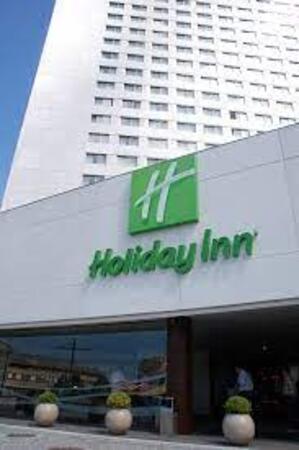
Holiday Inn Porto - Gaia
220, Rua Diogo Macedo, 220, Vila Nova de Gaia 4400-107 , Gaia, Portugal
From Porto by Metro
If you're coming from Porto city centre:
Take the Metro Line D (yellow line) toward Vila d’Este.
Get off at João de Deus.
From João de Deus, walk about 13 minutes to: Rua Diogo Macedo 220, 4400-107 Vila Nova de Gaia.
From Vila Nova de Gaia train station
If by “local train station” you mean Vila Nova de Gaia-Devesas:
The address is approximately 12 minutes walking from Vila Nova de Gaia station according to the accommodation's location information.
You can therefore walk directly rather than taking the metro.
Explore how Copilot for Finance can optimize reporting and elevate productivity. This instructor-led training in Gaia provides professionals with practical AI competencies to automate accounting duties, generate financial reports, and extract actionable insights, thereby improving efficiency in your daily workflow.
This instructor-led session in Gaia explores advanced Copilot Studio integration techniques for technical professionals. Learners will master secure SQL execution, recruitment workflow automation, and Power Automate orchestration, ensuring the deployment of robust, production-ready AI assistants.
This instructor-led, live training in Gaia empowers business professionals to master Microsoft 365 Copilot Chat for improved daily productivity. Discover how to create content, interpret data, and automate tasks across Word, Excel, PowerPoint, and Outlook by leveraging effective AI prompts and industry best practices.
This live course in Gaia empowers public sector employees to leverage Microsoft 365 Copilot for efficient document drafting, data analysis, and meeting summarization. Participants will acquire practical prompting techniques and responsible AI guidelines tailored for government workflows, ultimately enhancing their daily productivity.
Elevate your workplace efficiency with this instructor-led training on Gaia for Microsoft 365 Copilot. Master the skills to draft documents in Word, analyze Excel data, construct PowerPoint slides, manage Outlook emails, and optimize Teams collaboration. This course is perfect for professionals aiming to streamline their workflows using AI.
This live, instructor-guided course in Gaia empowers beginners to master Microsoft 365 Copilot, elevating their daily productivity. Learners will acquire practical competencies in drafting documents, interpreting data, managing communications, and fostering team collaboration through intelligent AI assistance.
This instructor-led, live training in Gaia (online or on-site) is designed for intermediate-level supervisors and IT officers who wish to expand their expertise in administering SharePoint and effectively utilising Microsoft 365 Copilot.
By the end of this training, participants will be able to:
Understand the fundamentals of SharePoint architecture and administration.
Configure and manage SharePoint sites and user permissions.
Implement security and compliance measures within SharePoint.
Integrate and manage Microsoft 365 Copilot features to enhance organisational productivity.
Apply best practices for data governance and content management.
This practical, hands-on course introduces participants to the world of AI agents within Microsoft 365 Copilot and shows how they can construct their own simple agents without needing any coding skills or extra tools.
Participants will examine Microsoft's pre-built agents, such as Researcher and Analyst, gain insight into how AI agents function in a business environment, and learn to design and utilise their own agents by leveraging structured prompts and workflows within Copilot.
The course centres on real-life scenarios, empowering participants to automate routine tasks, boost productivity, and develop reusable AI assistants that can be readily shared across teams.
Upon completing the session, participants will have created their own AI agent and will be equipped to apply this methodology in their day-to-day work.
This training is tailored for finance professionals who are already familiar with AI tools and wish to transition from sporadic usage to a confident, routine daily practice with Microsoft Copilot. Participants will refine their prompt engineering skills and apply Copilot directly to authentic finance tasks such as data reconciliation, forecasting, budgeting, and reporting. The session is highly interactive, revolving around live exercises using realistic financial datasets. All activities accommodate two parallel workflows: one for Copilot Chat (Basic, included with Microsoft 365) and another for Microsoft 365 Copilot (Premium, requires a paid license), ensuring that every participant works within the scope of their existing licence.
Agents enable teams to handle knowledge queries and streamline document workflows in a controlled manner. This two-day programme features an introduction to Agent Builder on the first day, followed by Copilot Studio on the second day, focusing on approval steps and testing. Participants will conclude the course with a fully tested knowledge agent and a preliminary draft of a Studio agent.
This live, instructor-led session in Gaia is tailored for key users, AI champions, and department leads who aim to develop custom Copilot agents for answering knowledge questions and managing document processes.
Upon completing this training, participants will be equipped to:
Determine scenarios where Copilot Chat suffices versus those requiring a dedicated agent
Configure a knowledge agent within Agent Builder, defining the target audience, knowledge sources, and operational boundaries
Comprehend the architectural structure of agents in Copilot Studio and develop an initial agent
Deconstruct document workflows into reviewable stages that incorporate human approval mechanisms
Validate agents using structured test cases and defined acceptance criteria
Categorise roles, permissions, licensing requirements, and operational considerations
Course Format
Duration: Two days (7 hours per day)
Interactive training sessions featuring a trainer, discussions, and practical exercises focused on participants’ specific use cases
Day 1 Outcome: Each participant will have a tested knowledge agent and a tool map tailored to their work scenarios.
Day 2 Outcome: Each participant will possess a draft Studio agent with approval features, two validated process cases, and a roadmap for their unique use cases.
Customisation Options
Please contact us to discuss arrangements for a customised training version of this course.
Managing projects in Microsoft 365 often involves navigating a complex landscape of Teams, Planner, Lists, and SharePoint, where significant time is consumed by status reporting and follow-up activities. This one-day course demonstrates how Copilot and AI agents can streamline status reporting, enhance meeting management, automate task tracking, and improve risk detection. Participants will develop a project knowledge agent and create a mock-up solution for a real-world project challenge.
Delivered as live, instructor-led training in Gaia, this session is designed for project managers, PMO staff, team assistants, and project members who utilize Microsoft 365, including Teams, Planner, Lists, and SharePoint.
Upon completion of this training, participants will be equipped to:
Classify and understand the role of agents in Microsoft 365 for project environments
Leverage Copilot to generate status reports from emails, meetings, and lists
Utilize agents within Teams and Planner to manage meetings and task workflows
Construct a project knowledge agent integrated with documents, lessons learned, and contact data
Enhance early visibility into risks and potential delays
Develop and present a mock-up solution addressing a specific project issue
Course Format
Duration: 1 day (7 hours)
Interactive learning with a certified trainer, featuring discussions and hands-on exercises tailored to participants' own use cases
Day 1 Deliverables: Each participant will have a generated status report, a tested project knowledge agent, and a presented mock-up for a real project problem.
Customization Options
For tailored training aligned with specific organizational needs, please contact us to discuss arrangements.
Artificial Intelligence & Digital Workspace Transformation / Modern Business Applications
This category focuses on the practical application of cutting-edge generative AI tools within enterprise office ecosystems, particularly Microsoft 365. Programs in this domain translate technical AI capabilities into concrete, repeatable business workflows that directly enhance operational velocity, reduce administrative overhead, and ensure corporate data compliance.
Microsoft 365 Copilot is integrated directly into Outlook, Teams, Word, Excel, and PowerPoint, leveraging the data that users already possess access to. This course demonstrates how to craft effective prompts, validate outputs, and utilize Notebooks, Pages, and AI agents. Upon completion, participants will have developed their initial FAQ agent based on a SharePoint knowledge base.
This live, instructor-led training in Gaia is designed for: Employees and departments using Microsoft 365 Copilot, ranging from novice to advanced users.
By the conclusion of this training, participants will be equipped to:
Differentiate between Copilot Chat and the Copilots embedded in Outlook, Teams, Word, Excel, and PowerPoint
Comprehend which data Copilot accesses and how permission controls are applied
Draft emails, prepare for meetings, generate reports, and create presentations using Copilot
Analyze data within Excel and verify the accuracy of the results
Write effective prompts and refine them if initial responses are insufficient
Utilize Notebooks, Pages, and the Researcher and Analyst agents
Construct a basic agent using a SharePoint knowledge base
Course Structure
Duration: Two days (7 hours per day), with an alternative option available as a learning journey in 2-hour sessions
Interactive instruction led by a trainer, including discussions and hands-on exercises tailored to participants' specific use cases
Outcome for Day 1: Each participant will have implemented at least one use case within the applications and saved two prompts for personal use.
Outcome for Day 2: Each participant will possess a notebook, a verified Researcher result, and a tested FAQ agent. Each group will present a solution concept with a mock-up.
Customization Options
To request a customized version of this training, please contact us to discuss arrangements.
Read more...
Last Updated:
Testimonials (3)
Everything is possible :-)
Sandra Bardewyck - Media Carrier Solutions GmbH
Course - Microsoft 365 Copilot: AI Productivity Across Word, Excel, PowerPoint, Outlook, and Teams
i already have some reports that i know, i will use some of the prompts that looked at today
Kelly Cotham
Course - Copilot for Finance and Accounting Professionals
Excellect knowledge level of the trainer
Pawel Dykowski - LKQ Polska Sp. z o. o.
Course - Microsoft 365 Copilot Chat for Word, Excel, PowerPoint, and Outlook
Provisional Upcoming Courses (Contact Us For More Information)
Online Microsoft 365 Copilot training in Gaia, Microsoft 365 AI training courses in Gaia, Weekend M365 Copilot courses in Gaia, Evening Microsoft 365 Copilot training in Gaia, Copilot for Office instructor-led in Gaia, Microsoft 365 AI private courses in Gaia, M365 Copilot coaching in Gaia, M365 Copilot on-site in Gaia, Evening M365 Copilot courses in Gaia, M365 Copilot instructor in Gaia, Copilot for Office instructor-led in Gaia, Microsoft 365 Copilot one on one training in Gaia, Weekend Microsoft 365 Copilot training in Gaia, M365 Copilot boot camp in Gaia, Microsoft 365 AI classes in Gaia, Online M365 Copilot training in Gaia, Microsoft 365 AI trainer in Gaia